

My 99 Exchange — Secure Dashboard to Read Exposure and Cash Out
Track and withdraw from one screen: once a 99Exch ID is signed in, my 99 exchange lays out six tiles, namely wallet, exposure from running bets, open bets, P/L statement, deposit and withdrawal keys, and password change. Read the first two together; cash-outs begin at ₹100.
My 99 Exchange Login — Secure 99Exch Card Before the Account Screen
Two fields, then your figures. 99Exch hands out the User Name and Password through its New ID desk, and the moment that pair is accepted the account screen loads with the wallet figure and the exposure figure sitting next to each other, which is exactly what the two read-only boxes on this card are copying.
This card is a mock: its boxes are read-only and store nothing, and its button simply opens the 99Exch sign-in on 99exchlogin.com.in.
My 99Exch Account Screen — Live 99Exch Figures on One Page
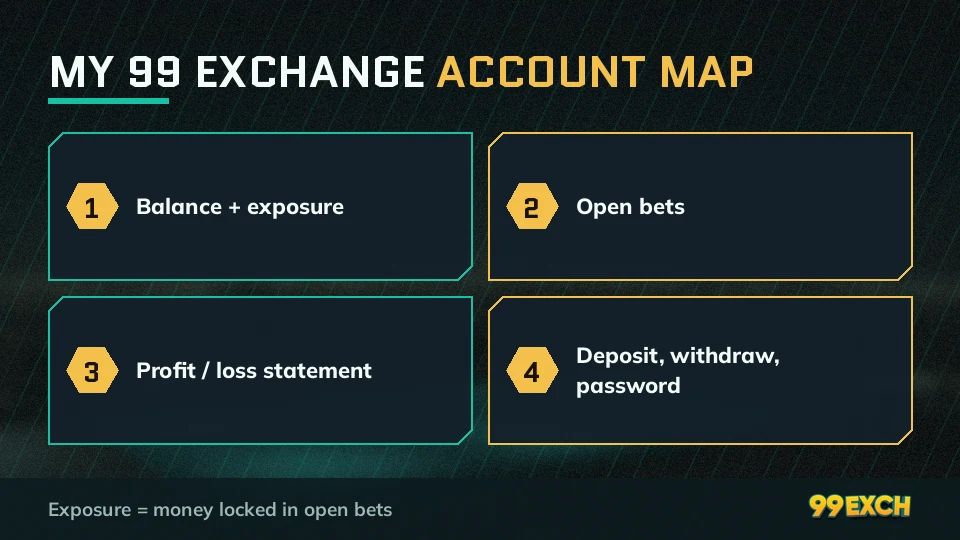
Most people who type my 99 exchange into Google already hold an ID. They signed in once, saw a handful of numbers on the 99Exch page, and now want to know which of those numbers is actually theirs to spend. Fair question. The account area after sign-in holds six things, and each answers a different worry: how much sits in the wallet, how much of it is tied up right now, which bets are still running, what the settled ones added up to, how to move money in or out, and how to replace the password the desk sent you.
- Balance₹1,000.00money held on the ID
- Exposure₹500.00locked by open bets
- Open bets1 runningnot settled yet
- P/L statementsettled onlywins, losses, voids
- Deposit · Withdraw₹100 minimumUPI, PayTM, PhonePe, bank
- Change passwordinside accountreplaces the desk password
Example figures for reading practice, not a real account.
None of these figures belong to the address you typed. 99Exch spreads its sign-in across several mirror addresses, since Indian ISPs block betting domains from time to time, yet the wallet, the open bets and the statement are attached to the ID itself; sign in on one working mirror before lunch and on another after dinner and you should see identical numbers on both. If you ever do not, stop there. That mismatch is a message for the desk, not a reason to keep refreshing.
A 99Exch wallet figure on its own can mislead you on a busy match day. Exposure is the slice of your money held against bets that have not settled, and until those markets close it is neither spendable nor gone. Look at both numbers before you decide anything.
One boundary, so expectations stay right. The account screen is where you read and where you do a handful of jobs (deposit, withdraw, change the password); bets themselves are placed on the 99Exch board, and the bet 99 exch back and lay page covers those rows one column at a time. Everything below assumes you are already signed in and looking at your own figures.
Where my 99 exchange sits once the secure 99Exch sign-in finishes
On this page, my 99 exchange means the six-tile screen sketched above, numbers that follow your 99Exch username from mirror to mirror, rather than any separate website or app you need to find.
Typing my 99 exchange login into a search bar? On this desk the phrase leads to one card, which hands you over to 99exchlogin.com.in, and from there the account screen opens with whatever tiles your ID currently holds.
What my 99exch shows you on a single live screen
| Item | What it tells you | When it moves |
|---|---|---|
| Balance | Money held on your ID | Deposit, withdrawal, settlement |
| Exposure | Amount locked by open bets | A bet is placed or settles |
| Open bets | Each bet not yet settled | The market closes or is voided |
| P/L statement | Result of settled markets | After each settlement |
| Deposit and withdrawal | Money in or out, ₹100 minimum | Your own request |
Every row in that table is read-only; my 99exch moves those figures only when a bet settles, a deposit lands or a withdrawal leaves, never because you refreshed the page.
- my 99 exchange login: the two-field 99Exch card, then straight to the account figures
- my 99exch balance check: the wallet figure read beside the exposure figure
- my 99 exchange statement: the profit and loss record, settled markets only
Order of checks inside my 99 exchange before any fast 99Exch cash-out
- Read the balance and the exposure together.
- Let open bets settle so the exposure drops back.
- Match the result against the P/L statement.
- Press withdrawal for ₹100 or more, with yourself as the payee.
Done in that order, the my 99exch numbers rarely surprise anybody.
99Exch Exposure on My 99 Exchange — Clear Worked Examples
Go back to the example screen above for a second: ₹1,000 on the balance tile, ₹500 on the exposure tile. That ₹500 has not left the 99Exch ID. Nobody has paid it to you either. It is the stake of the one running bet, held while the market stays open, and the tile only empties when 99Exch settles that market and the result lands on the balance tile.
A worked example makes it far easier than a definition. The prices below are made up for the arithmetic and the stakes start from a ₹1,000 wallet; your own 99Exch screen is always the record, and the exact way a mirror nets figures on screen may differ slightly from this sketch.
| What you did | Exposure shown | What happens at settlement |
|---|---|---|
| Nothing yet, ₹1,000 deposited | ₹0 | Full wallet free to use or withdraw |
| Backed a side for ₹500 at 1.80 | ₹500 | Win: ₹400 profit added · Lose: ₹500 gone |
| Laid a side for ₹200 at 2.50 | ₹300 | Side loses: you keep ₹200 · Side wins: ₹300 paid out |
| Market abandoned and voided | Falls to ₹0 | Stake returned, nothing in P/L |
Look at the second row first. When you back at 1.80, the most you can lose is the ₹500 stake, so ₹500 is what the 99Exch account screen holds aside. The lay row is the one that surprises new players, because laying means you take the bookmaker's side: someone else's ₹200 stake at 2.50 can cost you ₹300 if their side wins, and so ₹300, not ₹200, is the exposure on that bet. Same wallet, very different lock.
Two bets running at once usualy means two exposures added together, unless both sit on the same market, where a back and a lay can partly cancel each other out. That second case is real but niche, and the 99Exch back and lay rows are a better place to learn it than a balance page. For reading your own money, the simple rule holds: every open bet ties up its worst case.
99Exch Exposure Still Showing on My 99 Exchange — Quick Checks
Exposure that refuses to drop after a match has ended is probably the most common message the 99Exch desk gets about the account screen. In practice there are only three explanations: the market has not been settled yet (it happens a little after the final ball, not at the final ball), the bet was on a longer market that is still open, or the match was abandoned and is waiting to be voided, in which case the stake comes back as the 99Exch void-market terms describe. If none of the three fits, send a screenshot of the open bet to the desk.
Live Open Bets on My 99Exch — Reading Each 99Exch Bet Before It Settles
The open bet list is the reason the exposure figure exists. Every unsettled bet on your 99Exch ID sits there until its market closes, and each entry should tell you the event, whether you backed or laid, the price you took and the stake. Read it once before kick-off or the first ball. Then leave it alone, because staring at an open bet changes nothing on it, and most of the panic messages to the desk come from people who refreshed the list forty times during a rain delay.
Back Bet in My 99 Exchange — Clear 99Exch Exposure Line
Exposure equals the the stake. You backed for ₹500, so ₹500 is held. If the side wins, the profit lands on the balance and the hold is released; if it loses, the held amount is the loss and nothing more.
Lay Bet in My 99 Exchange — Real 99Exch Liability Line
Exposure equals what you would pay out. Laying ₹200 at 2.50 holds ₹300. If the side loses, you keep the backer's ₹200; if it wins, the ₹300 is paid out of your locked amount.
One composite case, pieced together from the kind of chats the 99Exch desk sees on a match night, shows how the list and the exposure figure fit together:
Match finished twenty minutes ago and my exposure still says ₹500. Did I lose it?
It is sitting in your open bets list, which means 99Exch has not closed that market. Give it a little time after the result is confirmed.
It just moved. Balance went up, exposure is zero.
That is the settlement. The result now sits in your P/L statement too.
Nothing was wrong with that 99Exch account; the market simply had not closed. It is worth knowing which bets are on long markets, too. A bet on a whole series or a tournament stays open for days or weeks, and its exposure sits on your balance for the entire stretch, so a wallet that looks smaller than expected in midweek is often just carrying one of those (people forget them more than anything else). Scroll the whole open bet list before you message anyone.
Can you cancel an open bet from the account screen? Hard to say for every mirror. On an exchange, a bet that has already been matched is usually fixed until settlement, so treat any bet in the open list as committed, and if something on it looks plainly wrong, take a screenshot and ask the desk instead of trying to fix it with a second bet.
99Exch Profit and Loss Statement in My 99 Exchange — Verified Settled Record
Open bets are the present tense of the account screen; the statement is its past tense. A market settles, the bet leaves the open list, the exposure it held is released, and a line appears in the 99Exch statement showing the result. That line is the closest thing your ID has to a receipt.
Use it for three jobs. First, to confirm a winning bet really was credited before you ask for a withdrawal. Second, to explain a balance that looks lower than you remember, because a statement read from top to bottom will show a loss you forgot faster than any chat with the desk. Third, to check a voided market came back as a void rather than a loss.
- Settled line
- One market that has closed, with the result applied to your 99Exch balance.
- Profit
- What a winning bet added on top of the stake that was held as exposure.
- Loss
- The held exposure that was taken when the bet lost; never more than that amount.
- Void
- A nil line: the held stake reappears on the balance tile instead of leaving it, and the terms page lists which situations count.
- Running total
- Your profit and loss added up across the period you are looking at.
A small habit helps here: read the statement for the same period you are worried about, not the whole history. If the question is why Saturday's balance looks off, Saturday's lines will answer it, and a three-month view only buries the answer under fifty other markets.
Deposits and withdrawals are money moving in and out, not betting results, so expect them to be tracked apart from the betting P/L rather than mixed into it. If a deposit you made never shows on the balance at all, that is a payment question, and the UTR help on the pay 99 exch page covers the UTR or screenshot the Deposit Issue desk asks for. Keep the statement for results. Keep the payment desk for money that went missing between your bank and the 99Exch wallet.
Change Password Inside My 99 Exchange — Fast 99Exch Account Step
Your first 99Exch password was typed by someone at the desk. That alone is the reason to replace it early, and the change-password option sits in the same account area as the balance tile; it is a short bit of typing, after which the 99Exch account opens only for whoever knows the new one.
- Sign in with the desk password. Use the User Name and temporary Password from the 99Exch chat on any working mirror.
- Open the account options. Find the change-password entry inside the account area, the same place the balance and statement live.
- Swap desk password for yours. The form wants the desk-issued password first; your own choice goes in after it, often typed a second time to confirm.
- Sign out and test it. Log back in, ideally from a second mirror, so you know the new password works across addresses.
That last step catches more problems than you would think. If the new password works on one 99Exch mirror and not on another, something went wrong with the change itself, and it is far better to find out today than on the night you want to withdraw.
What if the password is gone from memory entirely? Every tile on this page sits behind the sign-in, so not one of them can help you. A reset is a chat job instead; the Password Issue route on the 99exch login page has the detail, the OTP case included. Message only the number printed on the 99Exch WhatsApp number page.
No 99Exch desk needs your changed password to fix a deposit, a withdrawal or an exposure question. A username and a screenshot are enough.
Withdraw From My 99 Exchange — Quick 99Exch Cash-Out Checklist
Withdrawing starts on the same account screen. Press the withdrawal key, choose the method, enter the amount, confirm; the minimum is ₹100 and the methods match the deposit side, so UPI, PayTM, PhonePe or a bank transfer. The figure that decides how much you can take out is not the balance alone. Money held as exposure is still locked, so a ₹1,000 balance with ₹500 tied up in open bets has roughly ₹500 that can move today (and the rest becomes free only after those bets settle).
- Exposure at zero, or at least low enough that the free amount covers what you want out.
- Last winning bet visible in the profit and loss statement, not just in open bets.
- Amount of ₹100 or more.
- Your own UPI handle or bank account typed in, since a relative's account holds the 99Exch payout up.
- Password already changed from the temporary one the desk sent.
Every line on that list comes from something on the the account screen, which is the whole point: by the time you press withdraw on 99Exch, you should already know from your own figures whether the request can go through. Timings and the own-name rule in full sit on the play 99 exchange withdrawal page; the short version is that UPI and e-wallets are the quicker route and bank transfers take longer.
Requested but not arrived? Send the 99Exch Withdrawal desk three things: username, amount, and the time you pressed the key. Keep the open bets list closed while you wait, since it has no bearing on a payout already requested, and if you are unsure whether your ID carries real money at all, the 99Exch ID page on demo and real IDs settles that.
Before you press that key, a last habit. The account screen shows every rupee that is yours on this ID, held or free, and reading it in the order of balance, exposure, open bets and statement takes very little time. Do it each time. Most withdrawal trouble the desk handles started with a number someone skipped.
My 99 Exchange FAQ — Fast 99Exch Account Answers
What is my 99 exchange on 99Exch?
It is the account area you reach after signing in to a 99Exch ID. One screen shows your balance and exposure, the open bets, the profit and loss statement, the deposit and withdrawal keys and the change-password option. The same figures appear on every working mirror, because they belong to the ID.
How do I see my 99Exch balance and exposure?
Sign in, and both figures appear together in the account area. The balance is the money on your ID; exposure is the part currently locked in open bets. Read them together, since the locked amount cannot be withdrawn until those bets settle.
Where is the 99Exch profit and loss statement?
It sits inside the account area with the other account options. Each settled market adds a line showing profit, loss or void, and a running total. Read the lines for the day in question rather than the whole history, so a single result is easy to find and match against your balance.
How do I change my password inside 99Exch?
Use the change-password option in the 99Exch account area while signed in with the desk's temporary password: current one first, new one after. Then test it by signing in again on a second mirror. Forgot it completely? That case goes through the Password Issue desk, not the account screen.
How do I withdraw from my 99 exchange account?
Press the withdrawal key in the account area, pick UPI, PayTM, PhonePe or bank transfer, enter ₹100 or more and confirm. Only money not held as exposure can move, and it goes to an account in the ID holder's own name. The Withdrawal desk on WhatsApp handles delays.