
99Exch Login — Trusted Account Entry Plus a Demo ID to Practise
Sign in to 99Exch with two boxes and a captcha: paste the username the New ID desk sent, type your password, tick reCAPTCHA and press Login on 99exchlogin.com.in. Key gone? The Password Issue desk on WhatsApp replies with a temporary one. Curious first? The demo ID needs no deposit at all.
99exch login board · 9 Oct 2026
Field 1 → User Name, as issued by the New ID desk
Field 2 → Password, temporary at first, then your own
Gate → reCAPTCHA, then the Login button
Lost key → Password Issue desk sends a temporary one
OTP → asked only when 2FA is on inside the account

Secure 99Exch Login Replica With Both Fields Marked
reCAPTCHA check sits here, under the buttons
Sign in with 2 fields and 1 captcha tickLocked out of field 2? Text the Password Issue desk at the 99Exch WhatsApp number; a stand-in key comes back for the same username. Two fields only. The real card on 99exchlogin.com.in asks for exactly what this replica shows, so anything else you are prompted for, apart from an OTP when you switched 2FA on yourself, deserves a pause.
Fast 99Exch Login in Seven Moves, Card to Lobby
Most people who search for the 99exch login already hold an ID. They got it from the New ID desk, saved the username somewhere, and now want the shortest route back to the lobby. Seven moves. A first-timer needs all of them; a regular probably skips the last two.
- Pick the address. The buttons on this site open 99exchlogin.com.in in a new tab; if your network refuses it, a mirror the desk named that morning carries the same 99Exch card.
- Field 1, User Name. Paste it from the New ID chat, since a lowercase l read as a capital I explains more refused sign-ins than any forgotten key.
- Field 2, Password. A desk-issued key if the ID is brand new or was just reset, your own key on every other day of the week.
- The captcha line. 99Exch prints its reCAPTCHA notice beneath the two buttons, so on a small phone scroll a little and finish it before tapping anything.
- Press Login. If what loads shows money you never deposited, your thumb found the demo label; the decoder further down covers that mix-up.
- A code, if you asked for one. The one-time code screen only exists for accounts whose holder turned 2FA on.
- Retire the desk key. Inside, the change-password option swaps whatever the desk typed for something only you know.
Steps one and five carry the the traps. On step one, an address that refuses to open is usually an ISP block rather than a dead account, since betting domains in India get blocked from time to time and 99Exch keeps several mirrors where the same ID and the same balance work. On step five, the two buttons sit close together; tap the wrong one and you land in a practice lobby, wondering where your money went. It did not go anywhere.
The account area that opens after step seven, with balance, exposure and the change-password option, has its own page: what My 99 Exchange shows once you are signed in.
99 Exchange Login Password: Safe Handling From First Key to Your Own
Somebody at the New ID desk typed the first 99 exchange login password you ever used. That key travelled through WhatsApp right next to your username, which is exactly why it is meant to be temporary (the request itself, name plus mobile number, is explained on the 99Exch new ID page). Leave it in place and the only working copy of your password sits in a chat history. Not ideal.
The username and password you set work on http and https, with or without the /m/ path, and on each mirror the desk confirms. You never need a seperate 99Exch password per address. If an address asks you to create one, you are on the wrong page.
So the 99exch login password is a single thing. Change it once and the the change follows you to 99exchlogin.com.in, to the /m/login card on 99exch.com that the 99exch com login page describes field by field, and to whichever mirror the desk hands you next month.
- Day one, not day five: replace the temporary 99Exch key through the change-password option before that desk chat scrolls out of sight.
- Keep the username saved where you can copy it; the password belongs in your head or a password manager, not in the chat.
- Never type the 99Exch password on 99exch.io, which returned a 404 error in our 9 Oct 2026 check.
- One account per person, 18+: a shared password on a shared ID is the kind of setup the terms allow the operator to close.
That last point surprises people. Two brothers sharing one ID and one password feels harmless, and in practice it usually goes unnoticed until a withdrawal asks for an account in the ID holder's own name. Then it matters a lot, and the only clean fix is two IDs.
Quick 99exch Login Password Reset Through the Password Issue Desk
No email, no security question. A 99exch login password that slipped your mind is reset by a person at the Password Issue desk, reached on the same number as the New ID, Deposit Issue and Withdrawal desks. Six rungs below; start at the bottom one and only climb when it fails.
- One careful retype. After a reset, autofill is the usual culprit: the browser offers the old 99Exch key and a tired thumb accepts it.
- Read the address bar. If it says 99exch.io, or anything the desk never sent you, close the tab, because no reset fixes a wrong page.
- Start the chat by hand. Save +91 81097 11726 as a contact and open WhatsApp yourself; we print the number as plain text so no lookalike link can ride along.
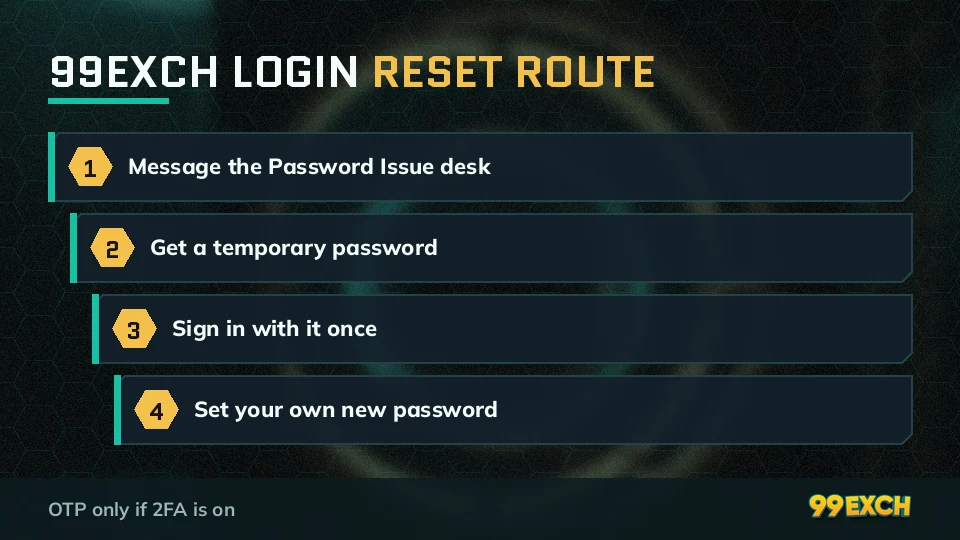
- Wait for the stand-in key. It arrives for the username you already have; the username itself does not change.
- Use it once. Same card, same captcha line, same Login button.
- Swap it out. Before opening a single market, replace the stand-in with a key of your own.
Password Issue desk. Which 99Exch username do you sign in with?
The one from the New ID chat last week. I set my own key on Sunday and it is gone from my head.
Next mesage has a stand-in key for that same username. It opens the card on 99exchlogin.com.in or any mirror we name; set your own straight after.
In. New key set.
A composite exchange, of course, not a transcript, but the shape is right. The desk replies 24/7, so a reset at two in the morning before a Test session in another time zone is not unusual. What the desk does not do is ask for your old password, an OTP or card numbers; the 99Exch privacy policy lists the three records this desk keeps, and none of them is a password. If somebody claiming to be the 99Exch desk asks for one, it is not the desk. Copycat numbers circulate, which is why the number on this site's 99Exch WhatsApp number page is the one to save.
Free 99Exch Demo ID Login for a Practice Run
Login with Demo ID is the longer of the two button labels on the 99Exch card, and the only door into the lobby that needs neither a username nor a deposit. Behind it waits a practice balance. Free to use. For anyone who has never seen a back and lay board, that beats putting ₹100 behind a fresh ID and learning by losing it.
Practice-Only 99Exch Login, Free of Any Deposit
One tap on the demo button. Practice balance only, nothing to deposit, nothing to withdraw. Good for learning where back and lay prices sit on the board. Results do not carry over to a real 99Exch account.
Real 99Exch Login With Your Own ID
User name and password from the New ID desk, which issues them in about a minute. Deposits start at ₹100 by UPI, PayTM, PhonePe or bank transfer, and withdrawals start at ₹100 too, paid only to an account in your own name.
People mix the two up more often than you would think. A typical case: someone practises on the demo ID for an evening, gets a real ID the next day, and then taps the demo button again out of habit, so the deposit they just made seems to have vanished. It has not. Sign out, press the plain Login button, and the 99Exch balance is where it should be.
Ready for a real ID? Read how the 99 exchange sign up works here: it covers the Signup button at the top right of the lobby and the details the desk asks for. In brief: name and mobile number to the New ID desk, one account per person, 18 and over.
Verified 99Exch Login Cards and Where They Loaded at 18:46 IST
A login only works on a page that actually loads. We tried the main 99Exch sign-in addresses at 18:46 IST on 9 Oct 2026; treat the results as a snapshot, because blocks and fixes come and go. The same 99Exch ID and balance applied wherever the card loaded.
| Address | What we saw on 9 Oct 2026 | Use it for the 99exch login? |
|---|---|---|
| 99exchlogin.com.in | Where every button on this site points | Yes, the default |
| 99exch.com/m/login | Answered with the card: Login plus Login with Demo ID | Yes, same username and password |
| 99exch.live | Answered with the Welcome to 99exch card | Yes, on that day |
| 99exch.win | Answered; only Download .apk under the card | Yes, but no WhatsApp button there |
| 99exch.io | HTTP 404, no exchange behind it | No, never type a password |
The .win row trips people up. That card shows a Download .apk link and nothing else underneath, so a player who needs a reset hunts for a WhatsApp button that is not there and assumes the 99Exch desk has gone quiet. It has not; the desk number is the same one printed on this site.
Working 99Exch Login Through the APK or the Browser
The sign-in card is the same whether it opens in Chrome or inside the app. Under the card on every 99Exch sign-in mirror sits a Download .apk link, and the app it installs asks for the very same User Name and Password; there is no separate app account and no second key to remember.
Quick 99Exch Login in the Android APK
Android only. Install from the Download .apk link on a working 99Exch mirror, open it, and type the username and password the desk issued. Install steps and the Play Protect warning are on the 99exch apk page.
Easy 99Exch Login in an iPhone Browser
The .apk file is an Android thing, so an iPhone signs in at the web card instead. Once you are in, Add to Home Screen pins that 99Exch card next to your other apps.
A store search throws up lookalike 99Exch app names that nobody has tied to the exchange (the APK page lists the two we saw), so your 99exch login password stays out of them. Install only from the link under the card.
In one line? Same key everywhere.
Clear 99Exch Login Error Decoder for Common Snags
Seven symptoms, each paired with its likely cause on 99Exch and a fix you can try yourself. Two tries per fix. After that, a screenshot sent to the desk beats a tenth attempt on the same card, because the person reading it can see at a glance whether you are on a dead address, the demo lobby or simply a mistyped 99Exch username.
- The address will not load, or times out
- Your 99Exch ID is fine; the domain is likely blocked on your network. On 9 Oct 2026, play99exch.live sat silent at 18:46 IST after working earlier that day, which is how fickle this gets. The desk names a live mirror.
- A plain error page with a 404
- You are on an address with no exchange behind it, such as 99exch.io in our check. Leave without typing anything.
- Login does nothing when pressed
- Usually the reCAPTCHA check is unfinished or has expired while you typed. Clear it again, then press Login.
- Username or password refused
- Paste the username fresh from the New ID chat, check caps lock, retype the key. A second refusal means the Password Issue desk and a stand-in key.
- A code is requested after Login
- Expected if you once turned on 2FA. If you never did, distrust the page asking, not your phone.
- You are in, but the balance looks empty
- Check whether you pressed Login with Demo ID by mistake. The practice lobby has its own balance.
- The account seems locked
- Hard to diagnose from outside. Message the Password Issue desk with your username and let it check.
Odd one out: the empty-balance case. It is not an error at all, just the demo button. Worth checking first.
Official 99exch login routes mapped to this page's card
Four search phrases end up here, and they all mean the same two boxes. The table shows what each one is really asking for on the 99Exch card.
| Search phrase | What the searcher needs |
|---|---|
| 99exch login | The sign-in card and the order of the two fields |
| 99 exchange login | The same card, typed with a space in the brand name |
| 99exch login password | A temporary key from the Password Issue desk |
| 99 exchange login password | The reset ladder, then a new password set inside the account |
99 exchange login searches and the quick answer each gets here
Space or no space, lowercase or capitals, the 99Exch card underneath is identical.
- Typed 99 exchange login with a space? Same 99Exch account, same User Name field, same reCAPTCHA check under the buttons.
- Typed 99exch login after a mirror stopped loading? Your ID still works; the desk confirms which address is up today.
- Typed 99exch login password at midnight? The Password Issue desk replies 24/7 with a temporary key.
99exch login password terms from the reset ladder, kept clear
- Stand-in key
- This page's nickname for the temporary password: it turns up in a desk chat and should survive exactly one sign-in.
- Password Issue desk
- The WhatsApp desk that handles a forgotten 99Exch password, one of four desks.
- 2FA and OTP
- An optional second step; the OTP prompt appears only if you switched 2FA on in the account.
- Demo ID
- Play money behind the longer button label; useful for learning the board, walled off from anything you deposit.
Safe 99 exchange login password habits for the desk-issued key
The first 99 exchange login password you ever use was typed by a desk agent, so treat it as borrowed. Change it inside the account on day one, keep the username copied somewhere handy, and never send the new password back into the chat, not even to prove you changed it.
Trusted 99Exch login help when the address or the key fails
An address that will not open is a mirror question for the desk; a refused key is a reset question for the Password Issue desk. Both answer on the same display number, +91 81097 11726, saved and typed to by hand, because this 99Exch access desk keeps it as text and never as a link.
99Exch Login OTP and 2FA: The Secure Extra Step
Out of the box, the 99exch login is two fields and a captcha. No code. An OTP appears only when the account holder has switched on 2FA inside the account, and from then on every sign-in asks for that extra code after the Login button is pressed. So if you never turned 2FA on, a sudden OTP request on a page claiming to be 99Exch should make you suspicious of the page, not of your phone.
Easy 99Exch Login With 2FA Off
User Name, Password, reCAPTCHA, Login. Four moves, done. This is how every new 99Exch ID starts.
Secure 99Exch Login With 2FA On
The same four moves, then a one-time code. A stolen password alone is no longer enough to get into the account.
The trade-off is real. 2FA makes a leaked 99Exch password far less useful to whoever holds it, but it adds a step, and if you lose access to the code you are back to messaging the desk. Whether that is worth it depends on how you store your password, roughly speaking. Someone who reuses one password across several sites gains a lot from 2FA; someone with a unique 99Exch password kept in a manager gains less, though still something. One rule holds either way: the OTP goes into the card, and never into a chat with anyone, the desk included.
A practical note on order. Set your own 99Exch password first, sign out, sign back in with it to be sure it works, and only then switch 2FA on. Doing it the other way round, with a temporary key still in place, means two things can go wrong at once.
Reliable 99Exch Login Support: What to Send the Desk
A sign-in problem is solved faster when it reaches the right desk with the right detail. 99Exch has run since 2019 with four WhatsApp desks behind one display number, and a login message that says only that something is not working usually needs a second round of questions before anyone can act.
- Card refuses the key: Password Issue desk, and lead with the 99Exch username.
- Never had a username: New ID desk, which works from your name and mobile.
- Inside, but a payment never showed: Deposit Issue desk, plus the UTR.
- Card will not even load: whichever desk, quoting the address and the clock time you tried.
Three details turn a vague complaint into a one-reply fix: the address in your bar, the button you pressed (Login or the demo label) and a screenshot of the card with the key field cropped out. With those, the 99Exch desk can usually tell straight away whether you need a mirror, a temporary key or nothing more than a second look at the username.
Leave the key and any one-time code out of the message. Your username is the handle the 99Exch desk works from, and a stranger who insists on more, from a number other than +91 81097 11726, has just told you who they are.

99Exch Login FAQ — Fast Answers on Passwords, Demo and OTP
How do I do the 99Exch login?
Open 99exchlogin.com.in or a mirror the desk confirms, type the user name and password the New ID desk issued, clear the reCAPTCHA check and press Login. If 2FA is on, enter the OTP next. On a first sign-in, change the temporary password from inside the account straight away.
I forgot my 99Exch password. How do I get back in?
Message the Password Issue desk on WhatsApp at +91 81097 11726 with your username. The desk sends a temporary password for that same username. Sign in with it on the usual card, then set a new password of your own from the account area before doing anything else.
Can I do the 99Exch login with my mobile number?
No, the card asks for a User Name, not a phone number. Your mobile number is what you gave the New ID desk to receive that username. Copy the username from the desk chat into the first field, then type your password and clear the reCAPTCHA check.
How does the 99Exch demo ID login work?
Press Login with Demo ID, the second button on the sign-in card. It opens a lobby with a practice balance and needs no deposit and no username. Nothing won or lost there carries over, so sign out and use the plain Login button for your real 99Exch account.
Why does my 99Exch login show an error or look locked?
Most often the reCAPTCHA check is unfinished, the username has a typo, or the address is blocked by your ISP. Re-copy the username, redo the check and try a mirror the desk confirms. If it still refuses or seems locked, message the Password Issue desk with your username.
Is the 99Exch login safe to use?
Yes, provided the page is right and the key is yours alone. Type it only on 99exchlogin.com.in or a mirror the desk confirmed, skip 99exch.io entirely, replace any temporary password straight away and keep OTPs out of chats. The 99Exch desk never asks for either one.
Does the 99Exch login ask for an OTP?
Only if you switched on 2FA inside your account. Without it, the 99Exch login is just user name, password and the reCAPTCHA check. With 2FA on, a one-time code is asked for after you press Login, and that code goes into the card only, never into a chat.